|
Busman's Holiday An Ode to my "Slab-O-Mac" by Steve Wood March 10, 2008 |
I had just changed my user profile the previous day on Moodle.org to read, "I'm a retired teacher now working as a freelance writer and trainer." I really hadn't even begun to write anything of value, and the only training I was doing was with the latest stray kitten my wife had "rescued."
I've always enjoyed Andy's writing, but thought he had it all wrong this time. He begins by saying:
In the middle of his posting, he assailed my choice of laptops, saying:
And he concluded by saying:
My view of my 12" Powerbook may never be the same. While I started out wondering about Andy's comments, I found myself repeatedly agreeing with his criticisms:
Then I found myself adding to Andy's list of shortcomings of the model.
Thanks to Andy's blog, now when I use my Powerbook, I find myself calling it my Slab-O-Mac! My decision to buy the Slab-O-Mac was based on some specific requirements at the time that dictated a small laptop. My budget, of course, was the first on the list, but I suppose I could have gone with a considerably cheaper iBook. But I'd worked with iBooks way too much when I was still in the classroom and really lusted after a Powerbook. The combination of the small footprint, sufficient VRAM to drive a big external screen, and well, yeah, I just wanted a Powerbook, not an iBook.
The 12" Powerbook replaced my Mac Mini at work and had to fit in the same desktop space as the Mini. As you can see, it was a tight fit. For a time, the Powerbook was my primary computer at work. I did workshops and presentations on the road with it without incident. On one occasion, the hotel where a major business education workshop was being held welched on free internet access. We were faced with an unacceptable internet access fee or no internet connection to demonstrate Moodle, an online application! So, we used the Powerbook's installation of a Moodle server for the demonstration. I constructed PowerPoints, brochures, posters, and fliers with it, never thinking about screen size since it mainly drove the Dell flat panel. But in time, as my demands to run more and more applications simultaneously overtaxed the Powerbook, I kept dropping into virtual memory, usually when I launched Dreamweaver. It was like driving into deep mud. The whole thing seemed to bog down. Shutting down applications wasn't really an option, as I often fielded customer service queries via a toll free line or email that necessitated having all the apps open and ready. I was also getting into making Flash and QuickTime video tutorials that were well beyond the Powerbook's capabilities. The poor thing's fan would be screaming by the end of the day if I didn't totally shut it down at lunchtime.
After leaving the job that "required" the G5 and the Powerbook, I found myself with a surplus of computer equipment (and a looming lack of cash :-). Since I already had another G5 that had always been what I considered my main computer, the second G5 went up for auction on eBay. I chose to keep the Powerbook. The Powerbook always physically felt like a solid, durable piece of equipment. I'd used lots of other work provided laptops over the years, but my Slab-O-Mac was the very first laptop I'd bought with my own money that was really mine. I guess I sort of treasured it, flaws and all. And then just last night, I dropped it! I swooped it up off the floor to find that the only visible damage was that the battery cover had come off. When I fired it up, it was unharmed. It had taken a good thump on one corner, so I had feared the worst. With our recent addition of a satellite internet connection at home and our own wireless network, the Powerbook gets a lot of use on the kitchen table (often while I'm cooking) or in the living room. In my upstairs office (writers garret?), it usually is only used with its drive mounted via Firewire on the G5's desktop for file transfer. With the 160 Gig hard drive I'd swapped into the Powerbook, it makes a dandy, if somewhat oversized, thumbnail drive for file transfers and has room for partititons for both Tiger and Leopard So let me sum up my attraction to the Slab-O-Mac:
I guess I disagree, agree, and disagree with Andy on his assessment of the Slab-O-Mac, but I sure enjoy reading his stuff. I also think a lot of my "free-floating love" of the 12" Powerbook is just sentimentality for my first laptop. I tend to hang onto "firsts" I've bought in computing. My first Mac, a Performa 575, is mothballed in the attic. My second personal Mac, a G3 mini-tower, still functions in my computer workshop. My third, the G5 that I'm using now, will probably remain for some time as well (possibly due more to budget constraints and its ability to run Classic apps under Tiger than to sentimentality). So while I'm not sure I've yet written anything of value, I've gotta thank Andy for at least getting me writing again. And as to the "Slab-O-Mac" thing, I think I'm going to consider it as a term of endearment. Update (8/14/2010)
So when I ran across a deal on Amazon for a Apple Powerbook G4 12 Battery When I checked the customer reviews My Slab-O-Mac remains in daily use to this day. While I have a desktop Mac in my home office, my PowerBook sits by my easy chair in our living room. I sometimes work on columns or web updates on it while watching TV, but more often, it serves to let my wife and I check on the movie being watched at the moment to see who stars in it, etc. I suspect if I regularly took the PowerBook on the road, it might fail fairly soon. It usually does go with us on short vacations. But for the most part, it just sits perched on a trash can waiting for my latest movie search. Update (5/31/2012) I retired my Slab-O-Mac this month in favor of a new Macbook Pro. I really didn't want to give it up and even looked at used 12" PowerBooks on eBay before deciding to go with a new laptop. The few laptops of the same model I found there were pretty rough, much like mine. After repeated falls off its perch of a book across a trashcan beside my easychair, the PowerBook's charger only made intermittent connection with the computer. The charger was still good, but something in the recepticle in the computer was obviously loose. Also, the WiFi card for some reason continually worked its way out, first giving a weak connection, followed by none. Pulling the battery and reseating the Airport Extreme card usually restored the WiFi, but even then, it was slow. And the PowerBook's screen was becoming dark in places. During a recent weekend visit by grandkids, the venerable computer took one fall to many off its perch. It's intermittent connection to the power supply became only occasional at best, making it pretty much unusable for anything other than quick looks at this or that on the internet. I'm a little sad at losing the PowerBook and sadder still at the dent the new MacBook Pro put in my checking account. But the new computer, complete with AppleCare and a hefty RAM upgrade, ended up costing several hundred dollars less than the PowerBook did when new. One More Update (6/3/2015) My G4 PowerBook sat mostly unused for three years in my computer workshop. I'd occasionally start it up just to see if it still worked. While the battery wouldn't take a charge, the PowerBook would run on its AC adapter as long as you didn't bump the adaptor's connector to the computer. In a freak accident involving a full glass of iced tea and my 13.3" MacBook Pro, I found myself without a good laptop computer at a time when getting to my upstairs office and computer were impossible due to total hip replacement surgery. While I awaited a replacement for the MacBook Pro, the Slab-O-Mac returned to service, sending and receiving emails and struggling to render web pages correctly. Working on the old PowerBook was an interesting trip back into operating systems' yesteryear. Functioning under the Tiger (Mac OS X 10.4) operating system, older applications still launched Apple's Classic OS 9 operating system. My Dreamweaver web builder was Macromedia instead of Adobe. But it all still worked. Wow! Talk about getting ones money's worth out of a computer! Send your feedback to
Ads shown on this site do not represent an endorsement or warranty of any kind of products or companies shown. |
|

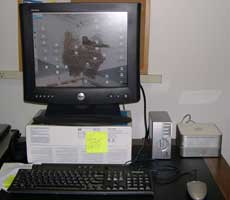
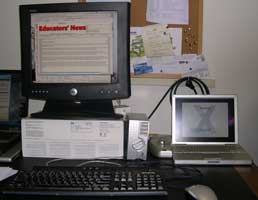
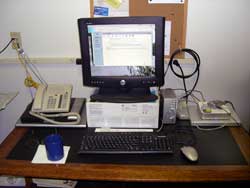
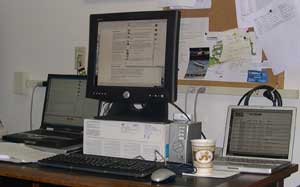 So...I popped for a used Power Mac G5 that had far more computing power and RAM. I also kept the Powerbook for road trips and later found it invaluable while conducting chats in some distance education classes I taught. I'd do my main work on the G5 hooked into the Dell flat panel, but also had my Compaq laptop running the class chat while the Powerbook displayed the site running log. That way, I could keep an eye on what was going on without constantly switching windows.
  (Mac OS 10.4 and 10.5).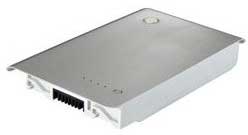
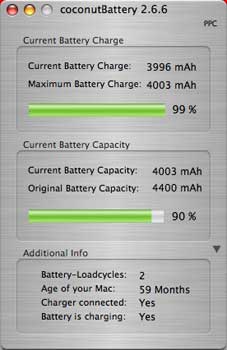
 for around $35 shipped, I jumped on it. When the battery came in, it had about an 80% charge on it. I fully charged it and then ran it all the way down to condition the new battery. To my surprise, my PowerBook just shut down at the end of the cycle, never displaying the usual low battery warning. When I checked the battery with Christoph Sinai's excellent freeware,
  on Amazon, I found that the shutdown without a warning was something others had experienced with this battery. I didn't find anyone with the battery capacity problem I had, though. But when you compare this battery, even at 90% capacity, with a replacement from
©2008 Steven L. Wood