The Educational Freewares of 2001
December 31, 2001
All sorts of best and worst-of-the-year lists, year in review and new year prediction columns show up online around this time of year. I've done my share of them in the past with A Final Blast for 2000, The Required New Years Column: Avoiding Complacency (1999), The Last Busman's Holiday...for 1999, and The Year of Mac: Christmas Bloat and New Year's Mayhem (1998).
I decided not to give Apple Computer any more free advice this year in my end of the year column, but to review some of the wealth of freewares that have appeared on the Educators' News site this year. The titles reviewed cover the gamut of possible platform combinations. Some are Mac or Windows only, while others will only work on certain Macs or with specific operating systems, and a few work on almost everything. The unifying criterion is that they must have appeared on Educators' News this year (meaning they've been introduced or updated this year), and they must be truly free. No demos, come-ons (How many times have you downloaded a "freeware," only to find out that it really isn't free?), or lites are included. Oh, yeah! It had to be a freeware I really liked and have used to make the cut for this column.
For sheer volume of freeware releases, Gary Smith of PolyMath Love Software is the hands down educational freeware superstar for the Mac platform this year. Gary cranked out at least seven new releases this year. Mainly aimed at students in grades 5-8, Gary's applications are stable, educationally justifiable, and just plain fun to use. Many of the games also fit into the tough to teach category of math applications and word problems.
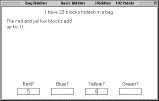
Bag Riddles (154K) supplies hints, one at a time, in achieving a solution to either "simple" or tough math riddles. The riddle "I have 23 blocks hidden in a bag," appears as shown below. As with Gary's Pizza Party Puzzles (289K), this application appears destined for some collaborative learning in my classroom.
  Tanker Rescue Squad (365K) is an engaging game that requires the effective use of measurement of angles to rescue a disabled tanker. While the game can be played onscreen, it's better if students can print the map to accurately measure angles and distance with a protractor and ruler. Tanker Rescue Squad (365K) is an engaging game that requires the effective use of measurement of angles to rescue a disabled tanker. While the game can be played onscreen, it's better if students can print the map to accurately measure angles and distance with a protractor and ruler.
  Area Puzzles (473K) presents the challenge of filling in a grid to match the numerical area values on the grid. Area Puzzles will work with System 7.1 or greater and works on both monochrome and color monitors. Area Puzzles (473K) presents the challenge of filling in a grid to match the numerical area values on the grid. Area Puzzles will work with System 7.1 or greater and works on both monochrome and color monitors.
In Adding Three Fractions (306K) students may select ruler or regular fraction problems. Changing to equivalent fractions is required but assisted. The application will also construct a practice worksheet of similar problems as worked in the application.
Other PolyMath Love Software titles reviewed (or just listed) this year on Educators' News include: Going to School (287K); Stock Market (305K); Linear System Beams (293K); Angle Fireworks (270K); and Fraction Sticks 1.0 (214K). Gary now offers 27 excellent math freewares for download on his Free Programs page. He also has an order page for his entire collection of 250+ math programs on CD.
 Travis East entered the educational freeware field this year with two excellent releases. Geometry is "designed for math teachers to easily calculate the volume and surface area of common geometric figures." It performs 18 different 2D and 3D calculations and is available in a variety of versions for different operating systems: DOS (24K); Windows (554K); Power Mac (618K); 68K Mac (498K); and OS X (697K). Travis East entered the educational freeware field this year with two excellent releases. Geometry is "designed for math teachers to easily calculate the volume and surface area of common geometric figures." It performs 18 different 2D and 3D calculations and is available in a variety of versions for different operating systems: DOS (24K); Windows (554K); Power Mac (618K); 68K Mac (498K); and OS X (697K).
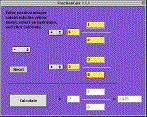 FractionCalc is another dandy freeware math application that can add, subtract, multiply, and divide fractions and mixed numbers. It also reduces the answers to lowest terms. In a recent email, Travis echoed what almost every freeware and shareware author writes: "If you have any ways that you think that the software can be improved, let me know." FractionCalc is available in several versions: Mac OS X (495K); PowerMac (412K); 68K Mac (285K); and Windows (346K). FractionCalc is another dandy freeware math application that can add, subtract, multiply, and divide fractions and mixed numbers. It also reduces the answers to lowest terms. In a recent email, Travis echoed what almost every freeware and shareware author writes: "If you have any ways that you think that the software can be improved, let me know." FractionCalc is available in several versions: Mac OS X (495K); PowerMac (412K); 68K Mac (285K); and Windows (346K).
 Last September, Tristan Harris released Bibliographer 1.0 for Macintosh. Bibliographer makes creating a bibliography in proper MLA format a breeze. It includes support for book, encyclopedia, URL, magazine, personal interview, radio-TV, speech, and video entries. Bibliographer presents a simple entry form for each entry type with examples available and then automatically creates the information into the proper bibliography entry. Last September, Tristan Harris released Bibliographer 1.0 for Macintosh. Bibliographer makes creating a bibliography in proper MLA format a breeze. It includes support for book, encyclopedia, URL, magazine, personal interview, radio-TV, speech, and video entries. Bibliographer presents a simple entry form for each entry type with examples available and then automatically creates the information into the proper bibliography entry.
 Blufire Software offers version 1.1 of their freeware math game GridX. Players race the clock trying to fill a 1-100 number grid by applying any combination of the four basic operations to three numbers displayed. The numbers change with each solve. It's easy at first, but becomes progressively more challenging as grid numbers get used. It's also a lot of fun! GridX is available in Carbon (731K) and PPC (620K) versions for Macintosh only. Blufire Software offers version 1.1 of their freeware math game GridX. Players race the clock trying to fill a 1-100 number grid by applying any combination of the four basic operations to three numbers displayed. The numbers change with each solve. It's easy at first, but becomes progressively more challenging as grid numbers get used. It's also a lot of fun! GridX is available in Carbon (731K) and PPC (620K) versions for Macintosh only.
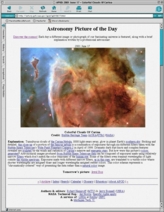
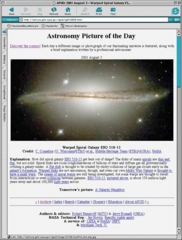
On days when I just came up dry for anything to post on the site with any color or pizzazz, I often turned to the Astronomy Picture of the Day Archive for dazzling color photos of planets, galaxies, and nebula. While not really freeware applications, I got a lot of mileage out of the APOD photos both on Educators' News and at school.
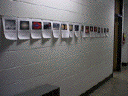 I used some PTO money last year to buy some cut rate photo printing paper and began printing and displaying the Astronomy Picture of the Day in the hallway. Kids just seem to gravitate towards space pictures. When the pages were rotated off the wall, we first archived them in a single binder which is kept for student use. Recently, I started having the kids bind the pages by the month. We keep the photo archives on a bookshelf with other free reading materials. I used some PTO money last year to buy some cut rate photo printing paper and began printing and displaying the Astronomy Picture of the Day in the hallway. Kids just seem to gravitate towards space pictures. When the pages were rotated off the wall, we first archived them in a single binder which is kept for student use. Recently, I started having the kids bind the pages by the month. We keep the photo archives on a bookshelf with other free reading materials.
 Call me a freeware freak (and you'll be right), but I actually flooded my kitchen one day last summer when I got lost downloading and playing with Harry Hooie Creations anAtlas. All the gory details appeared in Beware: MacIdiot at Work. Call me a freeware freak (and you'll be right), but I actually flooded my kitchen one day last summer when I got lost downloading and playing with Harry Hooie Creations anAtlas. All the gory details appeared in Beware: MacIdiot at Work.
 Since that time, anAtlas has become a student favorite in my classroom. This nifty Macintosh freeware contains an adequate basic database of geographic locations and can tap any number of internet resources. We began the school year by having students use it to locate and zoom in on their home. (We printed an aerial photo for each student as well.) Since that time, I find the kids use the freeware both online and as a standalone application for a variety of purposes. One boy was using it as a spellchecker for city names! Since that time, anAtlas has become a student favorite in my classroom. This nifty Macintosh freeware contains an adequate basic database of geographic locations and can tap any number of internet resources. We began the school year by having students use it to locate and zoom in on their home. (We printed an aerial photo for each student as well.) Since that time, I find the kids use the freeware both online and as a standalone application for a variety of purposes. One boy was using it as a spellchecker for city names!
The Read Me file lists a number of uses for anAtlas:
- Search local or Internet databases
- Find cities, states, provinces, countries, airports, caves, churches, schools, etc.
- See results displayed on a full color map
- Link quickly to Internet resources such as maps, weather, and imagery
- Find distances between locations by setting a "Home Base"
- Work with your own data by simply dropping or pasting it into anAtlas
anAtlas is available for Macintosh only in Classic (2.2 MB) and OS X (2.4 MB) versions. The current versions are 1.5.3 and 1.5.4, respectively, but a time limited version 2.0 preview is also available. I really suspect this application won't be a freeware too much longer:-(.
While it takes a bit more "doing," Windows users can access the U.S. Geological Survey imagery directly via the Microsoft TerraServer part of MSN Home Advisor. Images are limited to the United States only.
 In October I downloaded and tried a new Mac OS X only freeware, Unscrambler 2.0 (319K). Matthew Fahrenbac's creation gives multiple word suggestions, when possible, for groups of letters entered. Even if it doesn't get a match, it tries to form words using just part of the letters entered. While Matt's Read Me files states, "There's not a whole lot to this app - just enter a bunch of letters and it will give you a bunch of words :)," just unscrambling words for some dyslexic kids is a monumental task. I found that out this month as one of my long term students (6 years) was struggling with a list of scrambled Christmas words. I became painfully aware that I didn't have a machine at school capable of running the application (or OS X), so I took the last 3 scrambled words she couldn't solve home to unscramble for her. I wish there was a 68K version of Unscrambler that I could use on my students' take-home Macs. In October I downloaded and tried a new Mac OS X only freeware, Unscrambler 2.0 (319K). Matthew Fahrenbac's creation gives multiple word suggestions, when possible, for groups of letters entered. Even if it doesn't get a match, it tries to form words using just part of the letters entered. While Matt's Read Me files states, "There's not a whole lot to this app - just enter a bunch of letters and it will give you a bunch of words :)," just unscrambling words for some dyslexic kids is a monumental task. I found that out this month as one of my long term students (6 years) was struggling with a list of scrambled Christmas words. I became painfully aware that I didn't have a machine at school capable of running the application (or OS X), so I took the last 3 scrambled words she couldn't solve home to unscramble for her. I wish there was a 68K version of Unscrambler that I could use on my students' take-home Macs.
 Last week Dave Hirsch released Test Timer 2.0 (0.9 MB) for Mac OS X. Test Timer is designed to assist in proctoring timed exams that involve moving from lab station to station at fixed intervals. In Dave's words, it's "essentially a repeating alarm clock, with optional subsidiary alarms." Version 1.1 also remains available for Classic Mac OS users from the Test Timer site. Both versions are freewares. Last week Dave Hirsch released Test Timer 2.0 (0.9 MB) for Mac OS X. Test Timer is designed to assist in proctoring timed exams that involve moving from lab station to station at fixed intervals. In Dave's words, it's "essentially a repeating alarm clock, with optional subsidiary alarms." Version 1.1 also remains available for Classic Mac OS users from the Test Timer site. Both versions are freewares.
A "company" you might not normally associate with Macintosh educational freewares but should is John Schilling's StimpSoft. Both Smell-O-Mints, a periodic table, and Son of Weather Grok have obvious applications in the classroom (if your IT person hasn't blocked such stuff as Weather Grok).
  Smell-O-Mints does a good job of displaying basic and some advanced periodic table information. Smell-O-Mints works only on Power Macs with system 8.6 through Mac OS X. Separate Carbon (1 MB) and Classic (1012K) versions are available. Smell-O-Mints does a good job of displaying basic and some advanced periodic table information. Smell-O-Mints works only on Power Macs with system 8.6 through Mac OS X. Separate Carbon (1 MB) and Classic (1012K) versions are available.
Son of Weather Grok uses your internet connection to pull down current weather statistics from the NOAA station(s) of your choice. While Son of Weather Grok only functions on Power Macs, Carbon (1.2 MB), Classic (1012K), version 3.6.9 of Weather Grok, which still functions on 68K Macs, is also available.
 AWS's freeware Weatherbug offers similar capabilities as Weather Grok for Windows users and has been updated to version 3.0 to include XP compatibility. AWS's freeware Weatherbug offers similar capabilities as Weather Grok for Windows users and has been updated to version 3.0 to include XP compatibility.
Matthew Monroe offers the freeware Molecular Weight Calculator for Windows, version 6.0.4. The full download of the program (1.8 MB) "contains a Windows Installer MSI file to install and register each of the required files." The MWC home page also has smaller download links for those who only need the application.
I've watched folks practically sweat bullets trying to make a calendar master with spreadsheets and word processors. While I don't find that task very hard, I suspect it really can be a chore for new computer users. LuckyMe Software has released a freeware answer for such calendar challenged folks in Mom's Calendar b3.0.7 for Macinstosh (Classic [564K], Carbon [692K]). Mom's Calendar creates a 640x480 pixel printable calendar to which users may add notations.
 Tables 3.1 is a nice freeware math fact program by Georges Charitat that includes record keeping and reward functions. The interface seems a bit quirky, due to the mixing of some French and English words, but the application works well and is offered for the full spectrum of Mac OS's, with a carbon version for OS X and a fat version for PPC and 68K. Tables 3.1 is a nice freeware math fact program by Georges Charitat that includes record keeping and reward functions. The interface seems a bit quirky, due to the mixing of some French and English words, but the application works well and is offered for the full spectrum of Mac OS's, with a carbon version for OS X and a fat version for PPC and 68K.
 Andy Pritchard's Etchelon Macdoodle became a freeware this year. Designed for children between 3 and 12 years of age, Macdoodle (1.0 MB) contains 78 pictures to be colored and 260 picture suggestions to be completed and colored. (Note: This item was added to this posting 1/3/01. It was part of the original column right up until the time I checked links and found out I'd lost track of Andy's site. Upon finding Andy's URL, I added this item back into the column.) Andy Pritchard's Etchelon Macdoodle became a freeware this year. Designed for children between 3 and 12 years of age, Macdoodle (1.0 MB) contains 78 pictures to be colored and 260 picture suggestions to be completed and colored. (Note: This item was added to this posting 1/3/01. It was part of the original column right up until the time I checked links and found out I'd lost track of Andy's site. Upon finding Andy's URL, I added this item back into the column.)
In the going, going, almost gone department, Marc Weil of Northsoft Productions has spent the last year updating his freeware gradebook, NP Grade for Macintosh, from version 1.0 to 1.5. NP Grade 1.5 is available for download in Classic (3.3 MB) and OS X (5.6 MB) versions, but the Northsoft site also advises that versions beyond 2.0 will require a $20 shareware fee.
 If all of the stuff above doesn't quench your thirst for freeware downloads, try Freggie Heads, by Peter J. Baird. Freggie Heads (306K) allows one to add facial features to a tomato, carrot, banana, or pear. Sounds silly, doesn't it, but it really is cute. If all of the stuff above doesn't quench your thirst for freeware downloads, try Freggie Heads, by Peter J. Baird. Freggie Heads (306K) allows one to add facial features to a tomato, carrot, banana, or pear. Sounds silly, doesn't it, but it really is cute.
 A final freeware that's been around a long time deserves mention here. I made a posting about it on Educators' News last September. Craig Marciniak's SpellTools 1.3 (1821K) is an outstanding freeware spellchecker. It also enables the Mac's text-to-speech capability (if installed) in most programs, can clean up text from emails, and do case changes. The freeware version is from when Craig worked for Newer Technology. He has since regained the rights to SpellTools and has released a SpellTools 1.4 upgrade (144K), which works with System 9. Craig is planning to re-release this excellent utility as a shareware. A final freeware that's been around a long time deserves mention here. I made a posting about it on Educators' News last September. Craig Marciniak's SpellTools 1.3 (1821K) is an outstanding freeware spellchecker. It also enables the Mac's text-to-speech capability (if installed) in most programs, can clean up text from emails, and do case changes. The freeware version is from when Craig worked for Newer Technology. He has since regained the rights to SpellTools and has released a SpellTools 1.4 upgrade (144K), which works with System 9. Craig is planning to re-release this excellent utility as a shareware.
 I've included SpellTools in this listing, as it is one freeware I put on every Mac I send home with my students. While many Mac applications have a readback function built in, SpellTools gives the students a single interface to use across applications. I also use the readback function with Claris Home Page to do a final proofing of each column I publish! I've included SpellTools in this listing, as it is one freeware I put on every Mac I send home with my students. While many Mac applications have a readback function built in, SpellTools gives the students a single interface to use across applications. I also use the readback function with Claris Home Page to do a final proofing of each column I publish!
That's pretty well it. I left out a few titles that appeared on Educators' News this year for one reason or another. If you want to see the full list, which is simply a cut and paste from the daily postings, see Freewares on Educators' News.
And to the educational freeware authors, my sincere thanks.
Send Feedback to
Appreciate the content on Educators' News and mathdittos2.com?
If so, why not come back and click through one of the links from our affiliate advertisers the next time you plan to purchase something online. We'll get a small commission from the sale, and you won't pay any more than you would have by directly going to the vendor's site. |
Ads shown on this site do not represent an endorsement or warranty of any kind of products or companies shown.
|